Choosing a commercial cleaning robot is only part of the work. Between a signed order and a robot that cleans on schedule without supervision, there is a deployment phase: checking the site, installing the equipment, mapping the floors, setting up tasks, training staff, and confirming the robot performs as expected. How well that phase is planned has a large effect on whether the robot becomes part of the daily routine.
This guide explains what usually happens at each stage, what affects how long deployment takes, and what to confirm with your supplier. The exact steps vary by robot model and supplier, so treat it as a framework for your own plan. If you are still deciding which robot to buy, start with our demo checklist and Proof of Concept guide. For contract terms, see leasing vs. buying a cleaning robot.
Deployment at a Glance
Most deployments move through the same broad stages, even if the details differ.
| Stage | What happens | What your team usually provides |
|---|---|---|
| 1. Site readiness review | Routes, floor surfaces, thresholds, obstacles, network coverage, and a docking location are checked against the robot’s requirements. | Floor plans, cleaning schedule, access to the areas, and a facilities contact |
| 2. Delivery and installation | The robot is unpacked, charged, and checked. Any docking or charging station is installed. | Power, and water and drain access if the station refills and drains tanks; storage space |
| 3. Mapping | The robot builds a map of the areas it will work in. Zones to avoid are marked. | Cleared areas, an escort, and access during low-traffic hours |
| 4. Task and schedule setup | Cleaning areas, modes, and schedules are configured. | Cleaning priorities, time windows, and areas to exclude |
| 5. Integrations (if needed) | Elevator, door, or e-gate connections and network settings are configured. | Contacts for IT, security, and your elevator or door vendor |
| 6. Training | Operators learn daily operation, refilling and emptying, consumables, and how to respond to alerts. | Named operators for each shift, plus a backup |
| 7. Supervised runs and acceptance | Early runs are monitored and adjusted until the robot meets agreed criteria. | Someone to review results and sign off |
What Affects How Long Deployment Takes
There is no single deployment time that applies to every facility. A single floor with simple routes and no integrations is a very different project from a multi-floor building where the robot must ride elevators. Ask your supplier for a written plan with dates and dependencies, rather than one number. These are the factors that usually decide the schedule:
- Area and number of maps. Each floor or separate area may need its own map and tasks.
- Number of zones and task types. A robot that scrubs one hall nightly needs less setup than one that alternates between scrubbing, vacuuming, and spot cleaning across many zones.
- Floor complexity. Thresholds, ramps, floor drains, glass walls, mirrors, and very dark surfaces can all need extra checks or site changes.
- Integrations. Elevator and door connections usually depend on third parties, such as your elevator service provider or IT team, whose availability your supplier does not control.
- Network coverage. Weak Wi-Fi or mobile signal along cleaning routes can affect monitoring and remote support.
- Access windows. If mapping can only happen overnight or on weekends, the calendar stretches.
- Number of robots and sites. Rolling out across several buildings is usually done in phases. Our multi-location guide covers that in more detail.
- Staff availability. Training needs to reach every shift that will operate the robot.
Before Delivery: Site Readiness Checks
Every robot has physical limits for passage width, thresholds, slopes, and surfaces it can detect reliably. Getting the documentation for your specific model before delivery prevents most surprises. As an example of how specific these requirements are, the PUDU CC1 Operation Guide (V6.0) lists the following site conditions for that robot:
- Passages wider than 70 cm (about 27.5 in), with more than 75 cm (about 29.5 in) recommended for long corridors.
- Floor protrusions up to 8 mm (about 0.3 in) while cleaning, or up to 20 mm (about 0.8 in) when only passing through.
- Cleaning only on surfaces with a slope of 3° or less.
- Pure black, mirrored, or fully transparent surfaces about 14–22 cm (5.5–8.7 in) above the floor may need site changes, such as stickers, so the robot’s sensors can detect them.
Other robots have different limits, so use these only as an illustration of what to ask for. Alongside the manufacturer’s requirements, check these practical items:
- Docking location. A spot with power, out of the way of traffic, and with water supply and drainage nearby if the station refills and drains tanks automatically.
- Routes. Furniture, pallets, carts, cables, and temporary displays that block routes or change often.
- Network. Signal strength at the dock and along the main routes, and whether the robot needs approval to join your network.
- Floor surfaces and chemicals. Which floors the robot will clean and which cleaning solutions are approved for them. Our guide to what floors cleaning robots can clean covers common surfaces.
- Storage. Space for consumables such as brushes, pads, squeegee blades, filters, and detergent.
Mapping and Task Setup
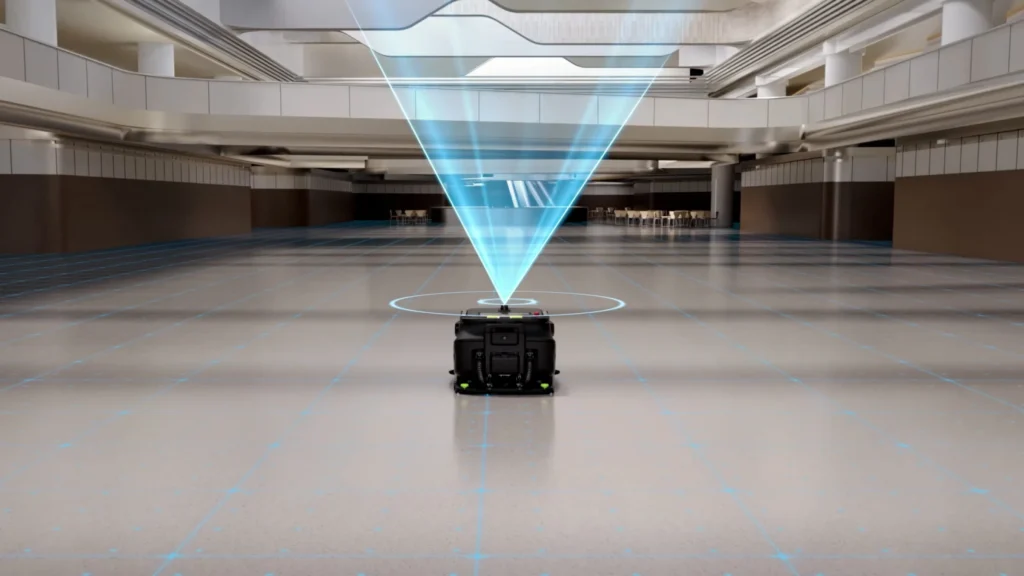
Mapping is how the robot learns the layout it will work in. The method depends on the robot: some are guided through the space by a technician, others use dedicated mapping tools. Once a map exists, cleaning areas, areas to avoid, and schedules are set on top of it.
The same PUDU CC1 guide gives a sense of how this works in practice. Tasks are built by selecting areas of the map and then choosing cleaning parameters, and the guide notes that automatic cleaning tasks are pre-configured by the delivery personnel. Scheduled tasks run only if the robot’s positioning is normal and it has enough power and water. Before an automatic task, the robot needs to be positioned at its visual positioning code. Details like these are why it pays to have the setup explained, not just completed.
To get the most from this stage:
- Walk the routes with the technician and point out areas to exclude, such as wet process areas, loading docks, or zones used for events.
- Agree on cleaning priorities and time windows before tasks are built, so the schedule matches how the building is used.
- Ask how changes are handled. When furniture, racking, or room layouts change, maps and tasks may need updating. Find out who does that and whether it is included in your agreement.
Elevators, Doors, and Network Access
Many robots can work across floors or through controlled doors, but these features usually require extra hardware and coordination. For example, ServicePro’s Oscar product page lists e-gate and elevator control as optional. Before counting on multi-floor operation, confirm:
- Which elevator and door systems the robot is compatible with, and what hardware must be installed.
- Who installs and configures it, and whether your elevator service provider needs to be involved.
- What your IT and security teams need to approve, such as network access and device management.
- How the robot behaves if an elevator or door is unavailable during a task.
Training Your Team
A robot that only one person knows how to run will eventually stop running. Training should reach every shift that will work with it, plus at least one backup operator. A practical training plan covers:
- Starting, pausing, and stopping tasks, and moving the robot manually.
- Emptying, refilling, and cleaning tanks, bins, and filters.
- Daily and weekly checks. Our cleaning robot maintenance guide explains a typical routine.
- What each alert means and who to contact.
- Reading cleaning reports or dashboards, if the robot provides them.
- How new staff will be trained later, and whether refresher training is available.
Supervised First Runs and Acceptance
Agree on what “working” means before the robot runs on its own. Write the criteria down, review the first runs against them, and adjust tasks where needed. Useful acceptance criteria include:
- The robot covers each defined zone and returns to its dock or charging point.
- Cleaning results on representative test areas meet your standard.
- Tasks finish within the available time window.
- Alerts reach the right person, and that person knows what to do.
- Your staff can run, refill, and empty the robot without the supplier present.
If you ran a Proof of Concept, compare the results with what you saw then. Differences are worth discussing with your supplier early.
Common Deployment Problems and How to Prevent Them
| Problem | Common cause | Prevention |
|---|---|---|
| The robot skips areas | The area is not included in the map or task, or the route is blocked | Walk the routes during setup and review coverage reports after early runs |
| The robot stops at thresholds or ramps | The threshold or slope exceeds the model’s limits | Measure thresholds and slopes before delivery and compare them with the documentation |
| The robot loses its position near glass or mirrors | Reflective, transparent, or very dark surfaces | Identify them during the site review and follow the manufacturer’s guidance |
| Scheduled tasks do not start | Low battery or water, or positioning problems | Confirm docking, refilling, and starting-position steps in training |
| Staff stop using the robot | No clear owner on each shift | Assign an owner per shift and a backup operator |
| Routes break after a layout change | The map no longer matches the space | Agree on who updates maps and how quickly |
Questions to Ask Your Supplier About Deployment
- What does deployment include, and is it included in the purchase price or agreement? Our pricing guide covers the cost side.
- Who performs site checks, mapping, and setup, and how much of it happens on site?
- What do you need from us before delivery?
- Can we see a written deployment plan with dates, and which steps depend on third parties?
- How are elevator, door, and network integrations handled, and by whom?
- How many staff will be trained, and is refresher training available?
- What are the acceptance criteria, and who signs off?
- Who updates maps and tasks when our layout changes?
- What support is available during the first weeks of operation, and how do we request it?
- How are software updates delivered?
If you are still comparing robot types, our guide on how to choose a commercial cleaning robot covers selection, and the floor scrubbers and multi-purpose cleaning robots categories show the current lineup.
Plan Your Deployment With ServicePro
A deployment plan is easier to build with the facility details in hand. When you book a consultation, it helps to have your floor plans, floor surfaces, cleaning schedule, any elevators or controlled doors, and the number of buildings you have in mind. The ServicePro team can talk through which robots fit and what deployment would involve.
Prefer to send a message? Use our contact page.