Autonomous cleaning robots take the repetitive driving out of floor care, but they do not run themselves indefinitely. Someone still empties tanks or bins, cleans brushes and squeegees, checks sensors, and responds when the robot asks for help. For facilities managers, the real question before buying is not whether a robot needs maintenance, but how much, how often, and who on your team will own it.
This guide explains the daily operating routine for a commercial cleaning robot, the weekly and periodic maintenance you should plan for, and how optional docking stations change the workload. General guidance applies to most autonomous scrubbers and sweepers. Where we give specific intervals, they come from the manufacturer’s published documentation for that model, and we say so.
The Short Answer: What Maintenance Does a Cleaning Robot Need?
Most commercial cleaning robots need three layers of care:
- Daily or per-run tasks that take a few minutes: emptying debris bins or dirty-water tanks, refilling clean water, removing tangles from brushes, rinsing the squeegee, and returning the robot to charge.
- Weekly to monthly tasks: wiping sensors and cameras, cleaning charging contacts, flushing suction hoses, and cleaning filters.
- Consumable replacement on a wear-based schedule: squeegee blades, brushes, filters, pads, and mop cloths.
How much of this falls on your staff depends on the robot type, how dirty your floors are, and whether you add accessories such as an automatic water and charging station.
Who Does the Work: The Robot, Your Team, and Your Provider
Successful deployments usually assign clear ownership rather than leaving the robot to “whoever is around.” A practical split looks like this:
- The robot drives the route, runs scheduled tasks, returns to charge (with a charging or docking station), and reports status and errors.
- A trained on-site operator, often a custodian or shift lead, handles the daily checks, empties and refills, clears minor issues, and moves the robot between areas when needed. Plan for at least one backup person per shift.
- A supervisor reviews cleaning reports, watches for missed areas or recurring errors, and orders consumables.
- Your equipment provider handles mapping changes beyond routine edits, software updates where required, repairs, and warranty work.
If you are still evaluating options, ask the vendor to demonstrate these routine tasks in person. Our guide on what to evaluate during a commercial cleaning robot demo covers how to test them.
A Typical Daily Operating Routine
Before the run
- Clear cables, cords, loose straps, and small debris that could tangle brushes or block a narrow route.
- Confirm battery level, clean water level, and that the dirty-water tank or debris bin is empty.
- Check that the correct cleaning components are installed for the task, for example scrubbing brushes and squeegee for wet cleaning, or sweeping components for dry cleaning.
- Make sure doors, gates, and temporary obstructions along the route are handled, and that the robot starts from its positioning point if the model requires one.
During the run
- Keep alerts going to a person who can respond, whether on the robot’s screen, a phone app, or a fleet management dashboard.
- Pause the robot before pushing, moving, or adjusting it. Manufacturers such as PUDU warn against dragging a robot or changing settings while it is moving.
- Note any zones the robot repeatedly skips or stops in. These are usually route, signage, or obstacle issues that can be fixed in the map or the facility layout.
After the run
- Drain and rinse the dirty-water tank on scrubbers, or empty the debris bin on sweepers.
- Remove hair, string, and shrink-wrap from brushes and rollers.
- Rinse and wipe the squeegee so dried residue does not cause streaks on the next run.
- Return the robot to its charging or docking position and confirm it is charging.
How Maintenance Differs by Robot Type
| Robot type | Typical routine tasks | What drives workload |
|---|---|---|
| Autonomous floor scrubbers | Refill clean water, drain and rinse dirty water, rinse squeegee, clean brushes and filters | Soil load, water hardness, detergent choice, whether auto refill and drain is available |
| Autonomous sweepers and vacuums | Empty trash bin or dust bags, clean or shake out filters, clear brush tangles | Debris volume, fine dust, packaging waste, whether auto-empty is available |
| Multi-purpose robots | Both of the above, plus switching components between wet and dry modes | How often you change cleaning modes and floor types |
Example: PUDU CC1 Maintenance Schedule (Manufacturer Guidance)
The PUDU CC1 is a multi-purpose robot that scrubs, sweeps, vacuums short-pile carpet, and dust-mops. PUDU’s CC1 Operation Guide (V6.0) publishes recommended cleaning intervals, which give a realistic picture of what an on-site team actually does. The manual notes that heavier soil means more frequent cleaning.
| Component | Recommended interval (PUDU CC1 Operation Guide V6.0) |
|---|---|
| Dust box, water filter box, trash box, filter sponge | Every 2 days, or once to several times daily depending on soil level |
| Side brush and roller brushes (remove tangles) | Every 2 days, or once to several times daily depending on soil level |
| Squeegee (rinse and wipe) | Every 2 to 3 days, or daily depending on soil level |
| Dirty-water tank (drain, rinse, brush) | Daily or every other day; 1 to 2 times per week for interior walls when an automatic refill and drain station is used |
| Suction pipe (flush with water) | Weekly |
| Roller brush chamber | Every 2 to 3 weeks |
| Sensors and underside | Every 3 to 5 weeks |
| Charging contacts on robot and station | Every 3 to 5 weeks |
| Clean-water tank filter | Every 3 to 5 weeks |
For consumables, the same guide recommends replacing the squeegee rubber blades about every month in high-wear environments, every two months in medium-wear environments, and every three months in low-wear environments. Roller brushes are replaced when the bristles wear down to a marked indicator, and side brushes, filters, and dust mop cloths are replaced based on condition. The robot’s device status screen shows the remaining life of tracked consumables.
Example: PUDU MT1 Sweeper Maintenance
Dry sweepers generally need less daily attention than scrubbers because there is no water to manage. PUDU’s MT1 maintenance tips list weekly wiping of the drive and auxiliary wheels, weekly cleaning of the vision sensors and LiDAR with a soft dry cloth, and cleaning the dustbin and air filter about every two weeks. The trash bin itself still needs emptying as it fills between runs.
According to PUDU, the MT1 has a 35 L trash bin, a run-time of 4 to 8 hours depending on cleaning level, under 3 hours of charging, and quick-release modules for the trash bin and other consumables. For carpet and fine-dust applications, the MT1 Vac uses dust bags and a separate trash bin, so its routine centers on bags and filtration.
How Docking and Self-Cleaning Stations Change the Routine
Docking stations are one of the biggest factors in how much hands-on time a robot needs. They are usually optional accessories, so confirm exactly what is included in any quote.
- Charging stations let the robot return to charge on its own when the battery is low and resume work, rather than waiting for someone to plug it in.
- Water docking stations for scrubbers can automate clean-water refill, dirty-water drainage, and charging. PUDU’s CC1 docking station also supports automatic detergent addition when configured. A mobile water station is offered for sites where plumbing changes are not practical.
- Self-cleaning stations go further. PUDU’s Self-Cleaning Docking Station for the CC1 series automates cleaning of the squeegee and roller brush after tasks, and PUDU states it reduces routine upkeep to a simple weekly water-tank rinse.
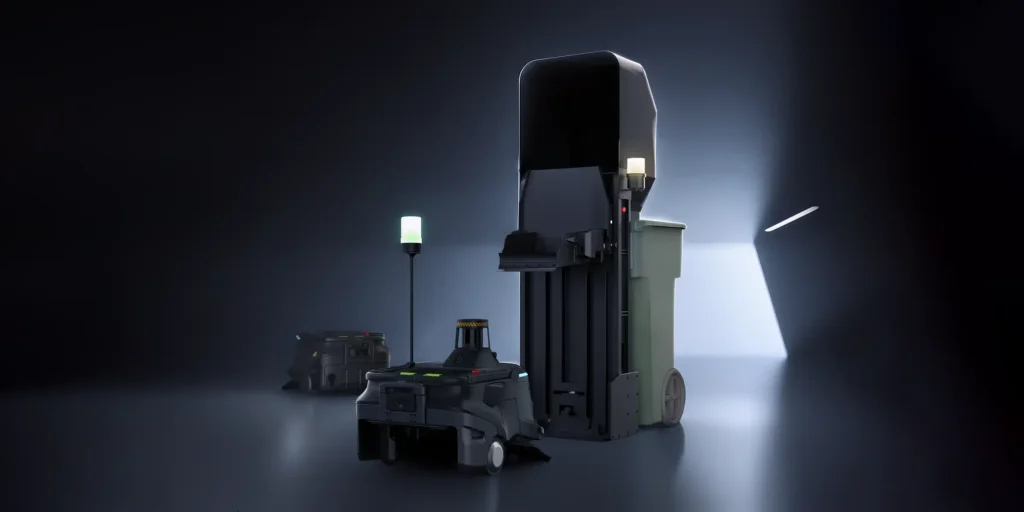
- Auto-empty stations for sweepers, such as PUDU’s optional Auto-Empty Station for the MT1, send the robot to empty its waste into an on-site bin and then resume cleaning.
Stations reduce labor but add cost, floor space, and site requirements such as power, a water supply and drain point, or a suitable waste container. They also need their own periodic cleaning. Our commercial cleaning robot pricing guide explains how accessories affect total cost.
Battery and Charging Practices
Battery care is simple but easy to neglect. General good practice, reflected in PUDU’s CC1 guidance, includes:
- Use only the manufacturer’s charger and replace a damaged charger immediately.
- Avoid running the battery down completely. PUDU advises keeping the CC1 above 10 percent; below 2 percent it enters a protection mode and must be charged before it can work.
- Fully charge the robot before first use and after any long idle period, and switch it off if it will be stored for an extended time.
- Keep charging contacts on the robot and the station clean, because dirt on the contacts can stop automatic charging.
For multi-shift sites, compare run-time and charging time against your cleaning windows. A robot that runs for several hours but needs about three hours to recharge may need its schedule split around charging periods, which is a common point to verify during a proof of concept.
Water, Detergent, and Floor Conditions
Scrubber problems often trace back to what goes into the tank and what is on the floor:
- Use approved detergents. PUDU specifies non-foaming, neutral detergents (pH 6 to 8) for the CC1 and excludes damage caused by non-specified detergents from free warranty service. Foaming products can fill the recovery tank with foam and interfere with suction.
- Watch for hard water. Limescale and debris from water lines can clog clean-water filters, which is why filter checks belong on the monthly list.
- Match the robot to the soil. Light-to-moderate soil is where most compact robots perform best. PUDU does not recommend the CC1 on surfaces with heavy oil contamination, so plants with oily floors should evaluate larger industrial scrubbers or keep some manual degreasing.
See what floors commercial cleaning robots can clean for more on surface compatibility.
Common Problems and First Checks
| Symptom | Likely cause | First check |
|---|---|---|
| Water left behind on the floor | Worn or dirty squeegee blade, blocked suction hose, loose recovery tank lid | Rinse and inspect the squeegee, flush the suction pipe, reseat the tank lid |
| Debris not being picked up | Full bin or worn brushes | Empty the bin, check bristle wear and tangles |
| Streaks or poor scrub result | Dirty brushes, clogged clean-water filter, wrong detergent | Clean brushes and filter, confirm detergent and dosing |
| Robot will not charge automatically | Dirty charging contacts or station placement | Wipe contacts on robot and station, check station position and power |
| Frequent stops or lost positioning | Dirty sensors, new obstacles, reflective or very dark surfaces | Wipe sensors, clear the route, ask your provider to review the map |
Facility Factors That Increase Maintenance
- Heavy dust, packaging debris, or shrink-wrap, common in warehouses and distribution centers.
- Oil, coolant, or metal fines on production floors, discussed in our guide to cleaning robots for manufacturing plants.
- Hair and fibers in schools, gyms, and hospitality spaces, which tangle brushes quickly.
- Multiple shifts per day, which multiply empties, refills, and consumable wear.
- Hard water or no convenient drain near the robot’s base.
Questions to Ask Before You Buy
- Which daily, weekly, and periodic tasks will our staff perform, and how long does each take?
- Which consumables does the robot use, what do they cost, and how quickly can we get replacements?
- What training is included, and is there a quick-reference guide for operators?
- What does the warranty cover, and what voids it?
- Who receives alerts, and can supervisors see status and cleaning reports remotely?
- Which stations or accessories are needed to reach the level of autonomy we expect?
Honest answers to these questions make the business case more accurate. If labor savings are part of your justification, account for the operator time described above, as covered in our article on reducing janitorial labor costs with cleaning robots.
Plan the Operating Routine for Your Facility
The right maintenance plan depends on your floors, soil levels, shifts, and staffing. ServicePro can help you match a robot and accessory setup to your site and outline the daily routine your team would actually run. Book a consultation or demo to discuss your facility’s requirements.